
HWID Spoofer
Spoof disk serials, MAC addresses and GPU IDs when new accounts fail only on this PC. Run the included cleaner before you launch Escape from Tarkov or other supported titles.
Quick read
Fingerprint refresh
Rotate disk, MAC and GPU values plus related fields when the ban follows the machine, not just the login.
6 additional items sit in the checklist farther down.
Overview
Reset hardware fingerprints after a machine ban
Panel shots below show identifier controls, cleaner hooks and access timing after a hardware flag.
The spoofer rewrites disk serials, MAC addresses, GPU IDs and adjacent identifiers so you can return after a hardware block on a refreshed profile. Vanguard, Easy Anti-Cheat, BattlEye, Ricochet, ACE, Javelin and similar stacks are in scope, with cleanup bundled.
Reach for it when only this PC rejects fresh accounts. Locked accounts themselves are unchanged. Weekly, monthly (31 days) and lifetime plans share one build.
Hardware bans vs account bans
Punishment can stick to the machine: if alternate accounts boot fine elsewhere yet fail on this box, the fingerprint likely tripped. The spoofer refreshes disk serials, MAC data, GPU IDs plus related strings so play resumes on a scrubbed profile—it never clears a restriction already sitting on the old login.
Anti-cheat coverage
Builds target Vanguard, Easy Anti-Cheat, BattlEye, Ricochet, ACE, Javelin and similar stacks. Lists evolve when vendors patch—validate your title on the product page before paying.
Bundled cleanup
Each license ships trace cleanup beside the spoof routine. Execute both passes in the portal order, then launch only after the guide marks the sequence complete.
System requirements
Windows 10/11 64-bit, admin rights, HVCI, Core Isolation, TPM, Secure Boot, plus reliable internet for activation and update pulls.
Coverage
What is included
Spoof targets and anti-cheat stacks covered by the current build.
- Disk serial rotation
- MAC address rotation
- GPU ID rotation
- Additional hardware fingerprint fields
- Trace cleanup utility
- Riot Vanguard (Valorant)
- Easy Anti-Cheat titles
- BattlEye titles
- Ricochet (Call of Duty)
- ACE, Javelin and other anti-cheats
Post-purchase
Screenshots · Access steps
Captions decode each panel; the opposite column walks portal login through spoof and cleanup.
Panel views
- Layer A
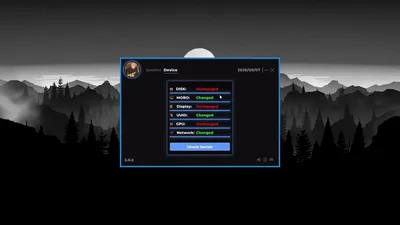
Serial audit grid
Rows show which stored hardware values refreshed after the last spoof session.
- Layer B
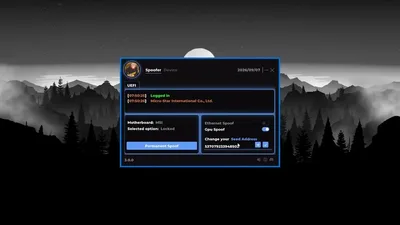
Firmware controls
Flip GPU or LAN spoofing, set a seed, and run persistent spoof from the UEFI tab.
More products
Pairs well with
Sibling utilities in the same store—each keeps its own license, detail page and checkout.
- Escape From Tarkov Cheats From $35 EFT cheat features include wallhack, radar, loot ESP, aimbot, silent aim, no recoil, no spread, God Mode, speedhack and fly hack for main raids—not Arena. Instant portal delivery. View details
- Cloud DMA From $35 Hosted rig access and client that bridge your game PC to off-machine cheat logic. View details
- Skin Changer From $35 Small-footprint client that paints premium guns, outfits and knives onto supported titles locally. View details
FAQ
Questions about this page
Answers tied to what you are reading. Visit the FAQ page for every topic.
Blog
Related guides
Filter by topic to find setup guides, feature deep-dives, and patch-day notes.
A new Tarkov account does not always get you back in. Here is what hardware IDs are, what a spoofer changes, and how to tell whether you actually need one.
Most repeat bans happen because people rush the sequence. Here is the order that actually keeps a fresh account alive: confirm, spoof, clean, then buy.
Escape From Tarkov community forum
Read discussion
Archived, read-only threads on loader setup, loot ESP, patch status, and HWID bans. Replies are closed.
- HWID Spoofer Spoofer reverted after a reboot, what did I do wrong Ran the spoofer, checked the IDs, all changed. Rebooted and everything is back to the originals. Is this a step I missed or a broken install.
- HWID Spoofer Banned, new account died in 3 days, is it my hardware First ban I assumed was the cheat. Second account lasted three days on the same PC with nothing changed. Starting to think it's not the account.